
Monthly report
The monthly report is a summary for your accountant: the month's sales and VAT, payments received, month-end receivables and prepayments, and stock value. Download it as PDF and CSV, or have it e-mailed to your accountant every month.
Open Sales → Monthly report. The page is shown to roles that may see invoices and cost prices (for example owner, admin, accountant).
Choosing the month
Choose the month at the top of the page. The previous month is selected by default — the one usually sent to the accountant. You can choose from the last 18 months.
The report is based on dates, so a past month's report gives the same figures when you run it again later.
What the report contains
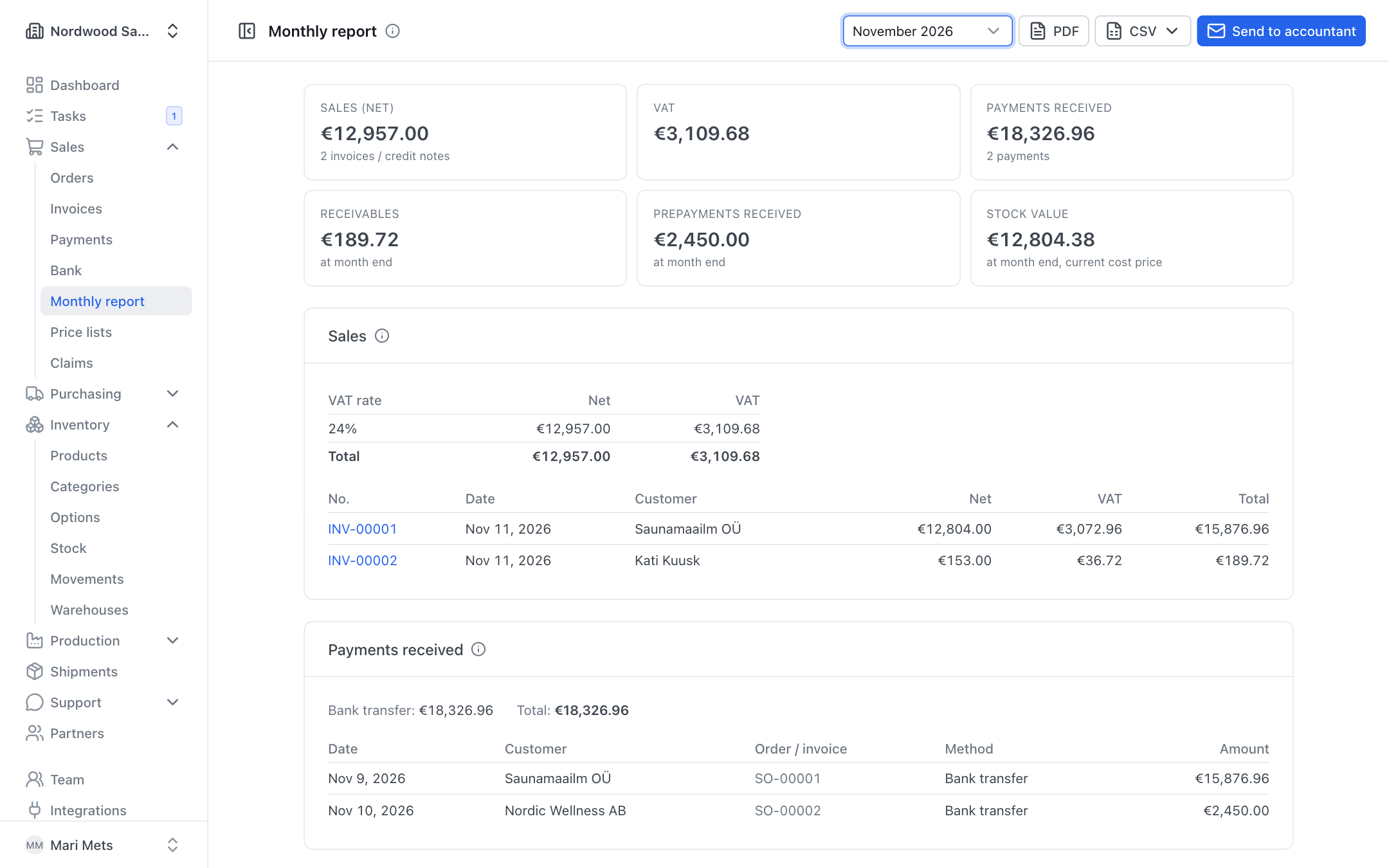
The top of the page shows a summary: Sales (net), VAT, Payments received, Receivables, Prepayments received and Stock value.
- Sales — invoices and credit notes issued in the month, VAT by rate, and the list of documents. Credit notes carry the label Credit note.
- Payments received — money received in the month, by payment method (bank transfer, card, cash, online payment …).
- Receivables — amounts invoiced but not paid at the end of the month. Overdue amounts are marked Overdue.
- Prepayments received — money received before the invoice was made. In the books it is a liability until invoiced or refunded. A cancelled order is marked cancelled — refund due.
- Stock value — stock at the end of the month, valued at the products' current cost price.
TIP
If you sell in foreign currencies, amounts are shown per currency. Payments in different currencies are never added together.
VAT return and EU sales list
When the month has invoices in a foreign currency or VAT-free sales (to EU businesses or export), you also see the VAT return block. It shows all sales in the company currency (foreign currencies at the ECB rate of the invoice date):
- normal sales by VAT rate;
- 0% intra-Community supply of goods;
- 0% services to EU businesses (reverse charge);
- 0% export.
If you sold to VAT-registered customers in other EU countries, the EU sales list below shows customer, VAT number, country and the amount of goods and services per buyer.
Downloading PDF and CSV
- PDF — the report as one file. It is in the company's document language (see Settings).
- CSV — choose Invoices (CSV) or Payments (CSV). The files are made for Estonian Excel: semicolon separated, decimal comma, and special characters open correctly. The invoices file also has the VAT treatment, the exchange rate and amounts in the company currency.
Sending the report to the accountant
- Choose the month.
- Press Send to accountant.
- Check the To address, add Cc if needed and edit the Message.
- Press Send to accountant.
The e-mail carries the PDF summary plus invoices and payments as CSV files. Roles that may change invoices (for example owner, admin, accountant) can send it.
Automatic sending every month
At the bottom of the page is the card Send automatically every month. Only an owner or admin can change it.
- Switch it on.
- Enter the Accountant's e-mail (and Cc if needed).
- Choose the Day of month (1–28) — on that day the previous month's report is sent.
- Press Save.
The card shows when the report was last sent. If automatic sending fails, you see "The last automatic report could not be sent" with the reason; ZERPY tries again an hour later.
WARNING
Switching it on counts the month that just ended as already sent. If your accountant needs that one too, send it with Send to accountant.